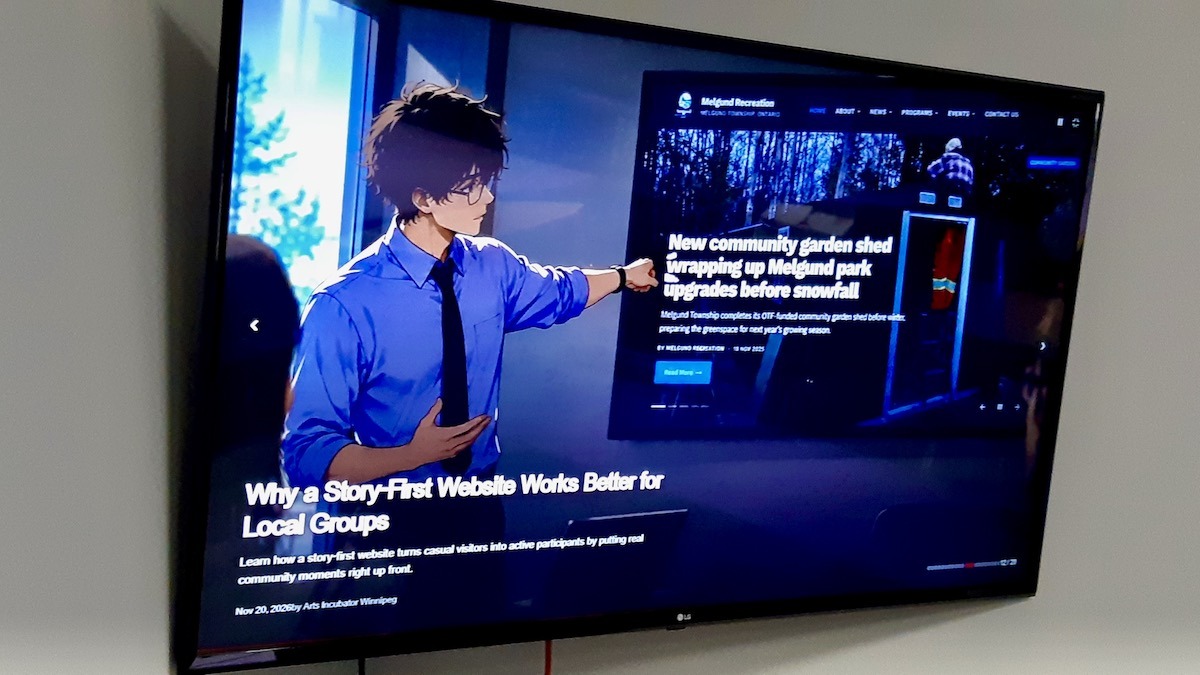
Built for arts and community spaces, it lets us filter posts, pick transitions, and go fullscreen with zero cable fuss.
Every arts spot and community rec hub knows the pre-event scramble. Someone digs for a spare HDMI cable, has to hunt down a memory stick with outdated graphics, or tries to screen-share from a laptop right as an OS update pops up.
When you have TVs and displays across different floors and rooms, keeping every screen fresh gets old fast.
Turning Published Posts Into a Live Loop
So we built a dead-simple WordPress slideshow plugin to skip the cable chaos. Instead of juggling sticks and screens for every room, it pulls our published posts—featured images, titles, excerpts, categories, dates—and turns them into a crisp 16:9 interactive slideshow.
It came together as a quick, hands-on fix for busy spaces. Anyone walking up can hit play or pause, flip slides with arrows or touch swipes, tap indicator dots, or pop straight into fullscreen. There is a live progress bar ticking along, plus optional intro and extro images so we can open or close a loop with clean full-bleed visuals and zero text clutter.
We kept it light in a single file while packing in plenty of room to play. We can set global defaults in the settings or tune each display on the fly—filtering categories, leaving certain ones out, sorting by publish date, randomizing, pulling recent edits, or spotlighting specific authors and tags. Crossfade or horizontal slide, tweak the count and timer, and show or hide headlines, snippets, and read-more buttons whenever we want.
Building Our Own Tools Instead of Paying Subscriptions
This is also another example of how we can code our own tools to do what we actually need. We do not have to buy a digital display plugin, rely on a third-party app, or get locked into annual subscriptions just to run slides on our own screens.
Best of all, our website stays the hub for everything. Post a new story or update an event online, and the screens around the building are already wired to share it—no thumb drive required.