From hours of manual work to a single click, our system turns hundreds of social assets into instant reality.
How We Automated Social Media Art for Thousands of Stories
If you work in communications, digital arts, or social media, you know the specific dread that comes with the phrase: “Can we get a social asset for that?”
It sounds simple. You just need an image. But then reality hits.
As most who visit our site regularly know, we have a library of thousands of short stories—millions of words in our databases. Every single one needs to look good when shared on Twitter, Facebook, or LinkedIn. That little preview card that pops up when you paste a link? That’s called an Open Graph (OG) image.
If that image is just a generic logo or a boring picture, nobody clicks. If it’s broken, nobody clicks. To make people care, every story needs a custom card: its unique title, the author’s name, mood-specific artwork, and our branding overlay.
Doing this manually for one story takes about 10 minutes in Photoshop or Canva.
Doing it for 1,000 stories? That’s 166 hours. A full month of full-time work, doing nothing but dragging text boxes and resizing JPEGs and PNG files. That isn’t art—it’s the pixel mines.
We didn’t want to spend a month in the mines. So, we built a robot to go down there for us.
The “Design Recipe” Approach
Instead of treating every image like a unique painting, we started treating them like a recipe.
Every social card is essentially a sandwich:
- The Base: Generated artwork from the story
- The Filling: Specific text—Title, Author, Reading Time
- The Garnish: Our logo, a “Read Now” button, maybe a dark filter so the text pops
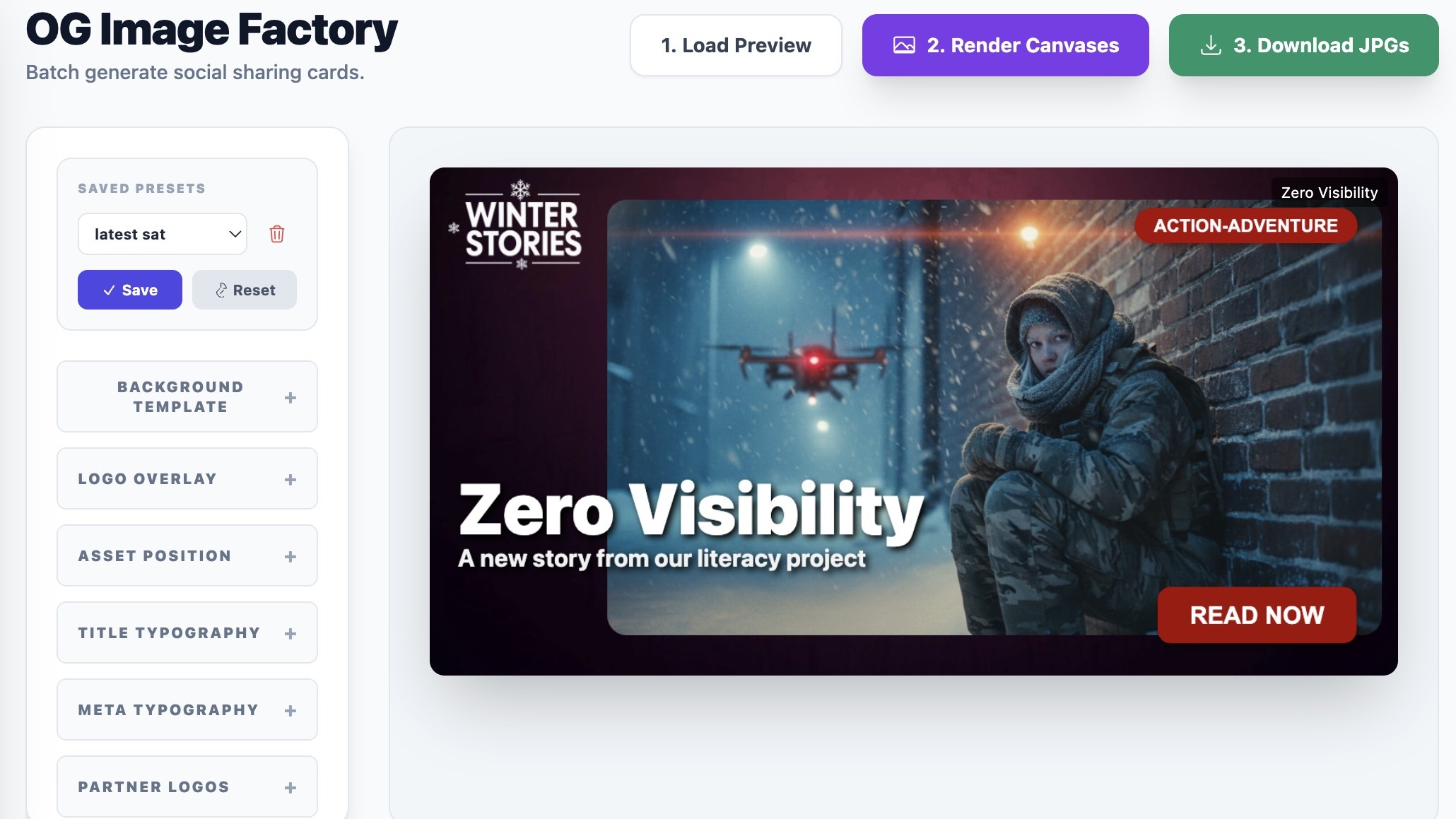
We built a simple internal “Factory” tool that lets us design the recipe, not the individual image.
We set the rules once: “Put the title here, make it big and white. Put the logo in the bottom corner. If the title is too long, wrap it automatically.”
We tweak the “Master Design” visually. Drag text around, swap layouts, experiment with fonts—until it looks perfect for one story.
The Magic Button
Here’s where the time travel happens. Once we’re happy with that one design, we don’t hit Save. We hit Batch Process.
The system scans our database and instantly applies the recipe to every approved story. It grabs Story A’s artwork, applies its title and metadata, exports a JPEG. Then Story B, C, D… all of them, hundreds of images in the time it takes to sip a coffee. We’re talking seconds.
It handles the heavy lifting, ensures the text is legible, keeps branding consistent, and produces hundreds of high-quality, custom-branded images—automatically.
No, we don’t use AI for this. In fact, we encourage people not to. Our system works purely programmatically. It’s faster than AI, doesn’t rely on guesswork, and doesn’t burn through a ton of compute or API tokens. It follows the rules we set, every time, producing consistent, high-quality images without the unpredictability of generative AI. This isn’t about replacing humans—it’s about automating the tedious parts so creators can focus on what they do best: making stories come alive.
Why This Matters
Yes, we saved hundreds of hours. But it’s bigger than that.
- Creative Freedom: Making images now costs zero time, so we can experiment. Swap fonts, layouts, and moods for entire campaigns instantly.
- Independence: No more expensive third-party tools that do the same thing but with less control.
- Scale: Publish one story or fifty—the marketing assets are ready the moment the story is finished.
Automation in the arts isn’t about having a computer write the stories (though we experiment with that too). It’s about letting the computer do the boring, repetitive, soul-crushing formatting work—so human artists and communicators can focus on what really matters: storytelling.
We built a system that turns “Oh no, I have to format 500 images” into “Done.” And that is a beautiful thing.
About the Author